How to configure my Online Store 2.0 theme to display packs on the product page?
Please go to the Themes page in Admin, and click Customize near your them. Next, select the Products page on the Theme Editor page.
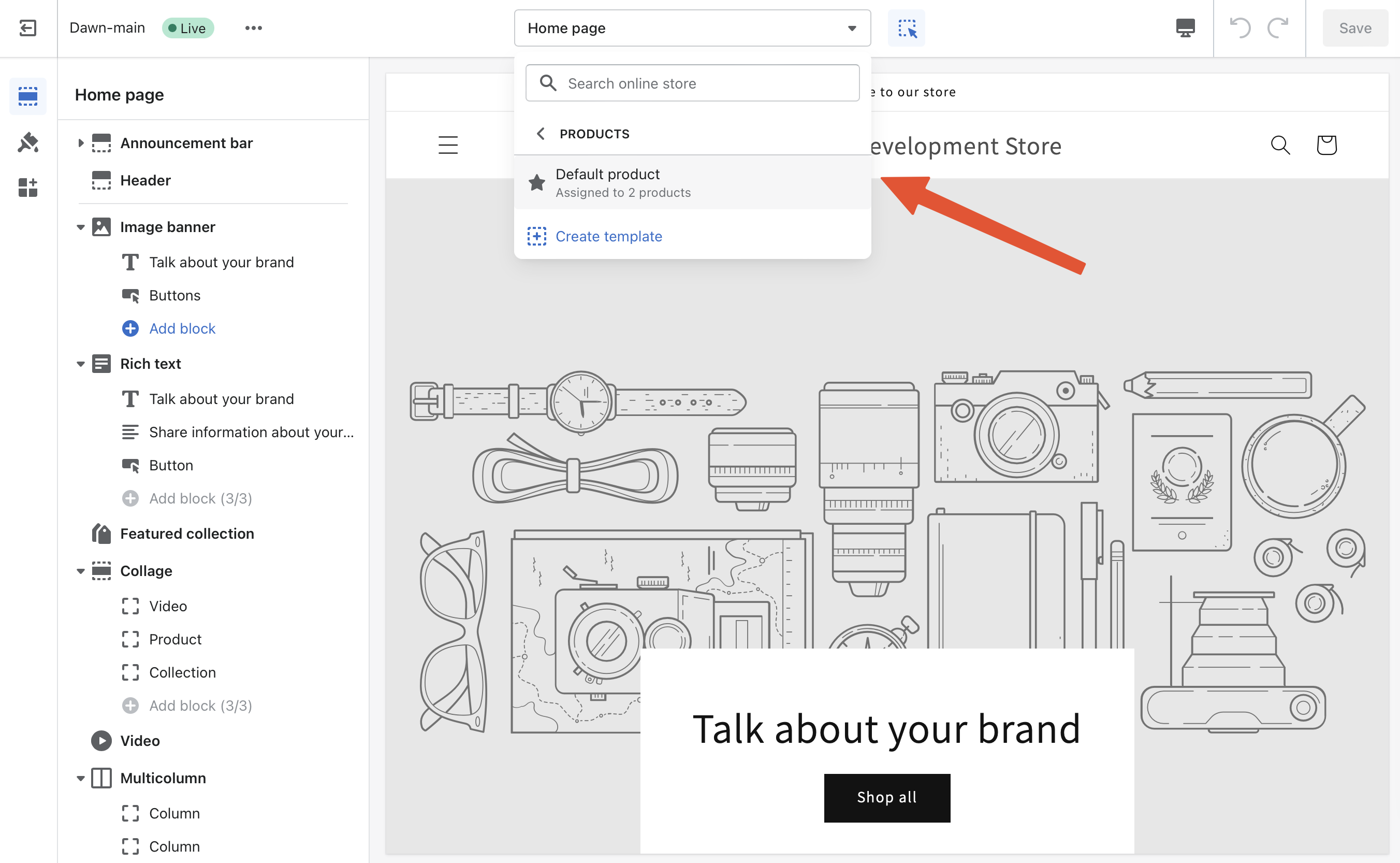
Now, click on the Add block link and find the Packs block.
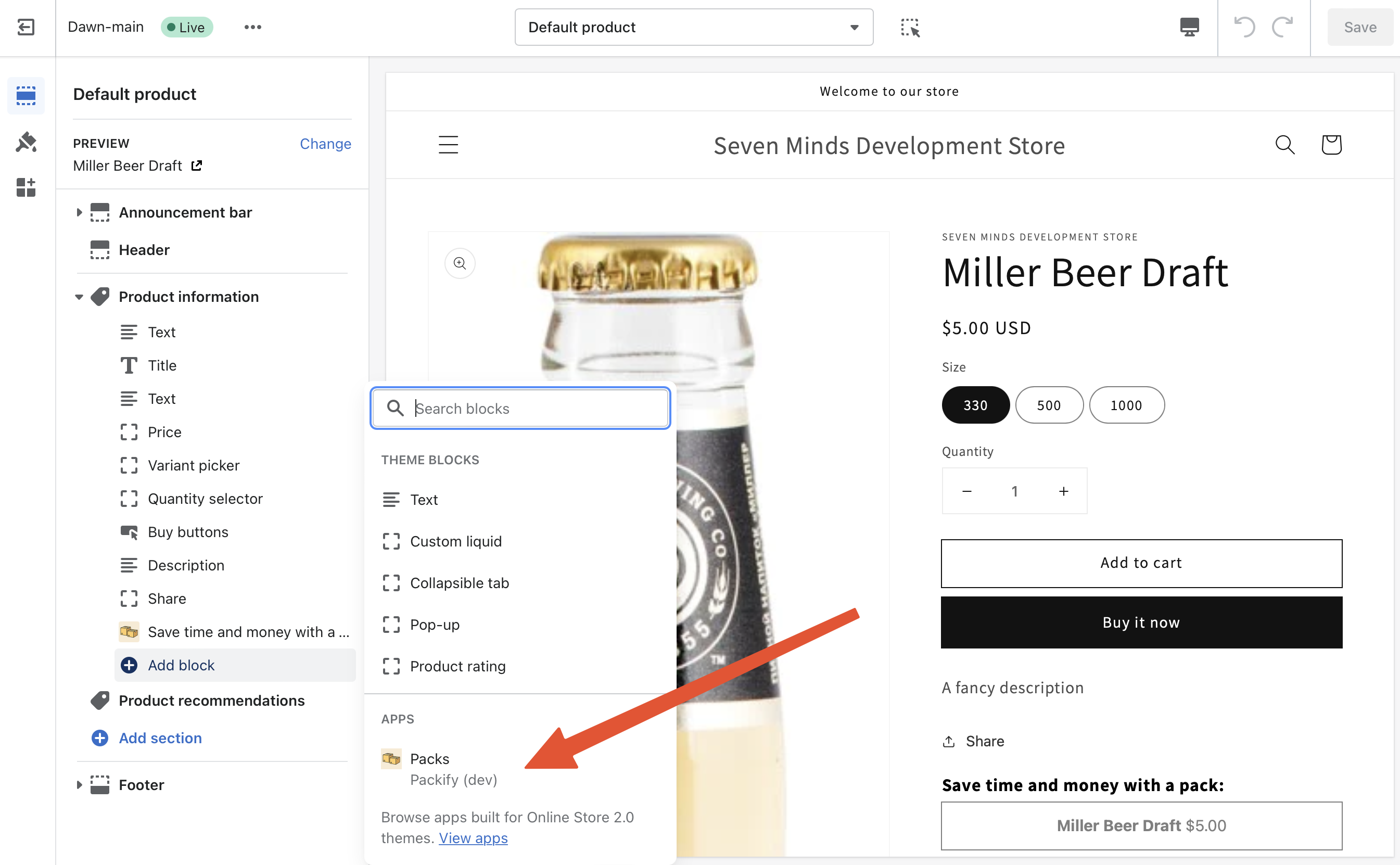
Finally, you can customize the look and feel of the block and its position on the page.

<div class="dynamic-checkout__content" id="dynamic-checkout-cart" data-shopify="dynamic-checkout-cart"> <shopify-accelerated-checkout-cart wallet-configs="[{"supports_subs":true,"supports_def_opts":false,"name":"shop_pay","wallet_params":{"shopId":29900368,"merchantName":"The Shop Tinkerers","personalized":true}},{"supports_subs":false,"supports_def_opts":false,"name":"paypal","wallet_params":{"shopId":29900368,"countryCode":"US","merchantName":"The Shop Tinkerers","phoneRequired":false,"companyRequired":false,"shippingType":"shipping","shopifyPaymentsEnabled":true,"hasManagedSellingPlanState":null,"requiresBillingAgreement":false,"gatewayType":"CONNECTED","merchantId":null,"sdkUrl":"https://www.paypal.com/sdk/js?components=buttons\u0026commit=false\u0026currency=USD\u0026locale=en_US\u0026client-id=AexZEtAxk09Ncgj6FSWFFyGKbxxAZ_LTyJ2DPdJWl1YUlecinmc5AfIaRF2qYjWlusWahlzz6SVkY5Ci\u0026intent=capture","serviceableCountryCodes":["AC","AD","AE","AF","AG","AI","AL","AM","AO","AR","AT","AU","AW","AX","AZ","BA","BB","BD","BE","BF","BG","BH","BI","BJ","BL","BM","BN","BO","BQ","BR","BS","BT","BW","BY","BZ","CA","CC","CD","CF","CG","CH","CI","CK","CL","CM","CN","CO","CR","CV","CW","CX","CY","CZ","DE","DJ","DK","DM","DO","DZ","EC","EE","EG","EH","ER","ES","ET","FI","FJ","FK","FO","FR","GA","GB","GD","GE","GF","GG","GH","GI","GL","GM","GN","GP","GQ","GR","GS","GT","GW","GY","HK","HN","HR","HT","HU","ID","IE","IL","IM","IN","IO","IQ","IS","IT","JE","JM","JO","JP","KE","KG","KH","KI","KM","KN","KR","KW","KY","KZ","LA","LB","LC","LI","LK","LR","LS","LT","LU","LV","LY","MA","MC","MD","ME","MF","MG","MK","ML","MM","MN","MO","MQ","MR","MS","MT","MU","MV","MW","MX","MY","MZ","NA","NC","NE","NF","NG","NI","NL","NO","NP","NR","NU","NZ","OM","PA","PE","PF","PG","PH","PK","PL","PM","PN","PS","PT","PY","QA","RE","RO","RS","RU","RW","SA","SB","SC","SD","SE","SG","SH","SI","SJ","SK","SL","SM","SN","SO","SR","SS","ST","SV","SX","SZ","TA","TC","TD","TF","TG","TH","TJ","TK","TL","TM","TN","TO","TR","TT","TV","TW","TZ","UA","UG","UM","US","UY","UZ","VA","VC","VE","VG","VN","VU","WF","WS","XK","YE","YT","ZA","ZM","ZW"]}}]" access-token="501064acf5007febc8aacdcd65a58195" buyer-country="US" buyer-locale="en" buyer-currency="USD" shop-id="29900368" cart-id="34dc2ae0815802f42e62913548c2abbf" enabled-flags="["1172c16a","a1d1f9a1","f5afabb3","370070f3"]" > <div class="wallet-button-wrapper"> <ul class='wallet-cart-grid wallet-cart-grid--skeleton' role="list" data-shopify-buttoncontainer="true"> <li data-testid='grid-cell' class='wallet-cart-button-container'><div class='wallet-cart-button wallet-cart-button__skeleton' role='button' disabled aria-hidden='true'> </div></li><li data-testid='grid-cell' class='wallet-cart-button-container'><div class='wallet-cart-button wallet-cart-button__skeleton' role='button' disabled aria-hidden='true'> </div></li> </ul> </div> </shopify-accelerated-checkout-cart> </div>