How to configure my legacy, non Online Store 2.0 theme to display packs on the product page?
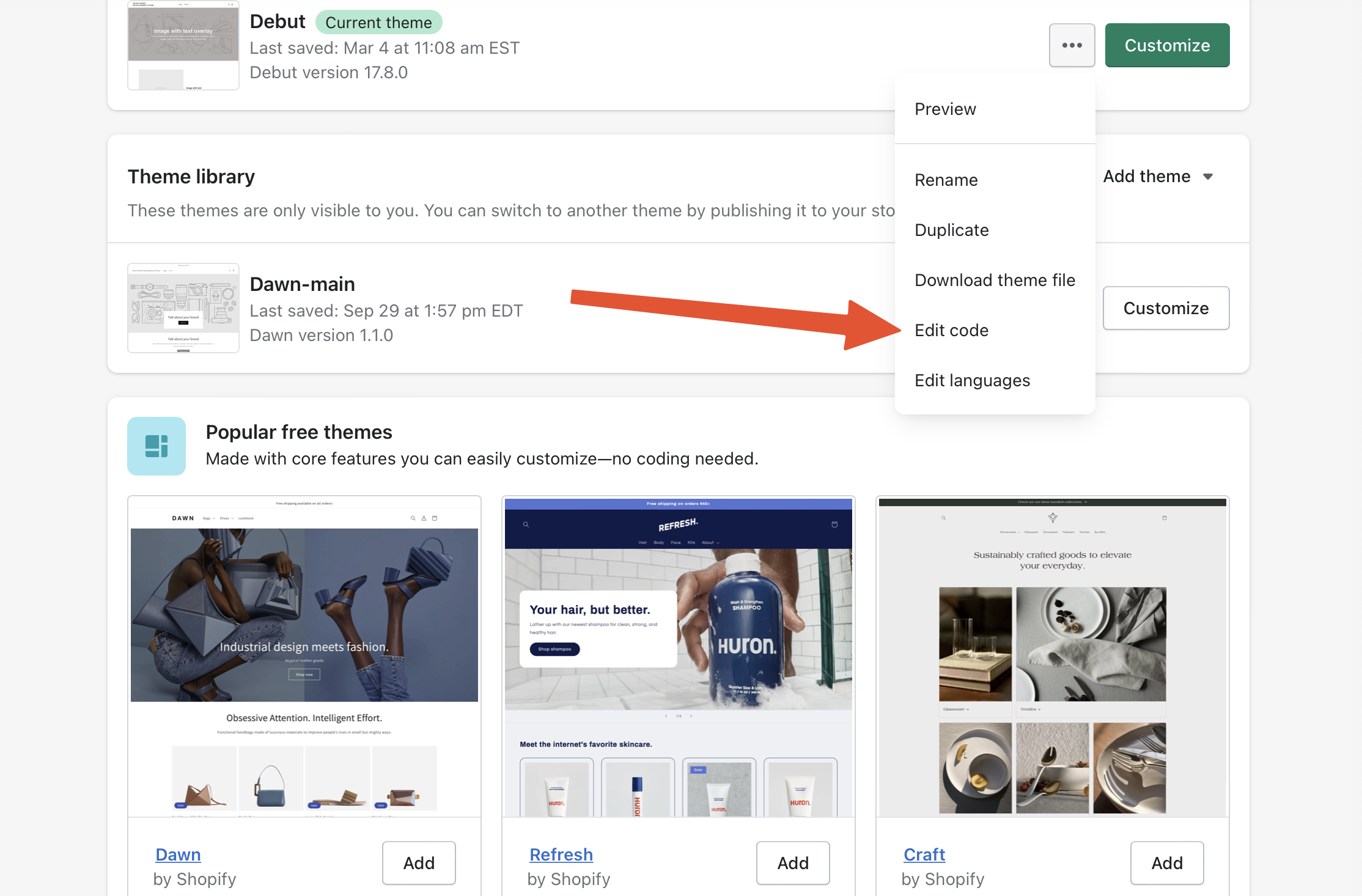
Please go to the Themes page in Admin, and click Edit code link.
Please find the file that renders your product page among the theme files. It could be named differently, e.g., product-template.liquid
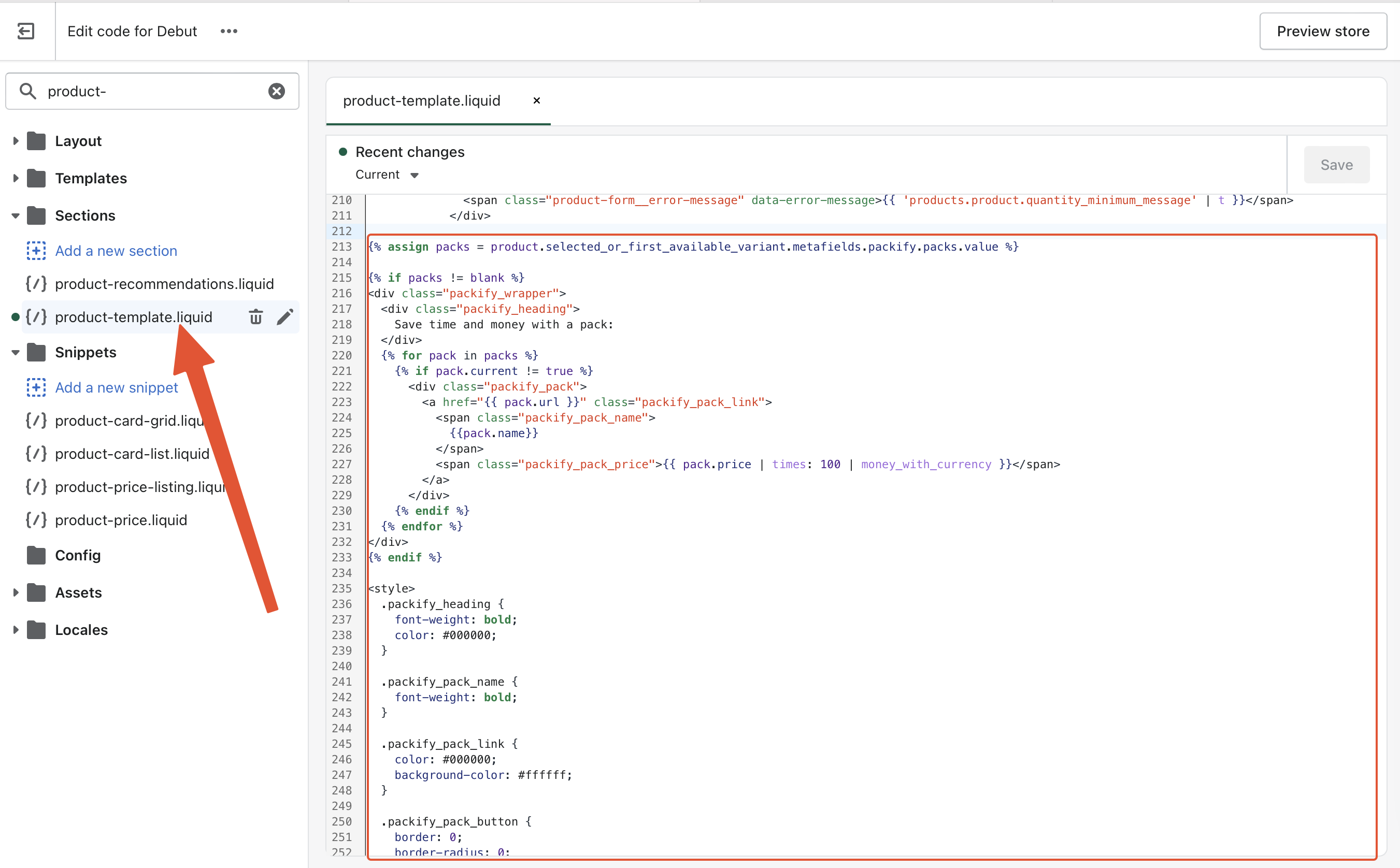
Finally, find the Packify block code on the Settings page and insert it in your product template.
<div class="dynamic-checkout__content" id="dynamic-checkout-cart" data-shopify="dynamic-checkout-cart"> <shopify-accelerated-checkout-cart wallet-configs="[{"supports_subs":true,"supports_def_opts":false,"name":"shop_pay","wallet_params":{"shopId":29900368,"merchantName":"The Shop Tinkerers","personalized":true}},{"supports_subs":false,"supports_def_opts":false,"name":"paypal","wallet_params":{"shopId":29900368,"countryCode":"US","merchantName":"The Shop Tinkerers","phoneRequired":false,"companyRequired":false,"shippingType":"shipping","shopifyPaymentsEnabled":true,"hasManagedSellingPlanState":null,"requiresBillingAgreement":false,"gatewayType":"CONNECTED","merchantId":null,"sdkUrl":"https://www.paypal.com/sdk/js?components=buttons\u0026commit=false\u0026currency=USD\u0026locale=en_US\u0026client-id=AexZEtAxk09Ncgj6FSWFFyGKbxxAZ_LTyJ2DPdJWl1YUlecinmc5AfIaRF2qYjWlusWahlzz6SVkY5Ci\u0026intent=capture","serviceableCountryCodes":["AC","AD","AE","AF","AG","AI","AL","AM","AO","AR","AT","AU","AW","AX","AZ","BA","BB","BD","BE","BF","BG","BH","BI","BJ","BL","BM","BN","BO","BQ","BR","BS","BT","BW","BY","BZ","CA","CC","CD","CF","CG","CH","CI","CK","CL","CM","CN","CO","CR","CV","CW","CX","CY","CZ","DE","DJ","DK","DM","DO","DZ","EC","EE","EG","EH","ER","ES","ET","FI","FJ","FK","FO","FR","GA","GB","GD","GE","GF","GG","GH","GI","GL","GM","GN","GP","GQ","GR","GS","GT","GW","GY","HK","HN","HR","HT","HU","ID","IE","IL","IM","IN","IO","IQ","IS","IT","JE","JM","JO","JP","KE","KG","KH","KI","KM","KN","KR","KW","KY","KZ","LA","LB","LC","LI","LK","LR","LS","LT","LU","LV","LY","MA","MC","MD","ME","MF","MG","MK","ML","MM","MN","MO","MQ","MR","MS","MT","MU","MV","MW","MX","MY","MZ","NA","NC","NE","NF","NG","NI","NL","NO","NP","NR","NU","NZ","OM","PA","PE","PF","PG","PH","PK","PL","PM","PN","PS","PT","PY","QA","RE","RO","RS","RU","RW","SA","SB","SC","SD","SE","SG","SH","SI","SJ","SK","SL","SM","SN","SO","SR","SS","ST","SV","SX","SZ","TA","TC","TD","TF","TG","TH","TJ","TK","TL","TM","TN","TO","TR","TT","TV","TW","TZ","UA","UG","UM","US","UY","UZ","VA","VC","VE","VG","VN","VU","WF","WS","XK","YE","YT","ZA","ZM","ZW"]}}]" access-token="501064acf5007febc8aacdcd65a58195" buyer-country="US" buyer-locale="en" buyer-currency="USD" shop-id="29900368" cart-id="fb749e59866d1e94f96004fdc6824d7d" enabled-flags="["1172c16a","a1d1f9a1","f5afabb3","370070f3"]" > <div class="wallet-button-wrapper"> <ul class='wallet-cart-grid wallet-cart-grid--skeleton' role="list" data-shopify-buttoncontainer="true"> <li data-testid='grid-cell' class='wallet-cart-button-container'><div class='wallet-cart-button wallet-cart-button__skeleton' role='button' disabled aria-hidden='true'> </div></li><li data-testid='grid-cell' class='wallet-cart-button-container'><div class='wallet-cart-button wallet-cart-button__skeleton' role='button' disabled aria-hidden='true'> </div></li> </ul> </div> </shopify-accelerated-checkout-cart> </div>