How to add a new case/pack with Packify?
If you have a product that you want to sell in packs, please click on the Create a pack button and select the product.

Next, you can click on the Add new pack button and enter the Quantity in the pack (e.g., 6, 10, 24, etc.). Finally, click on the Save button.
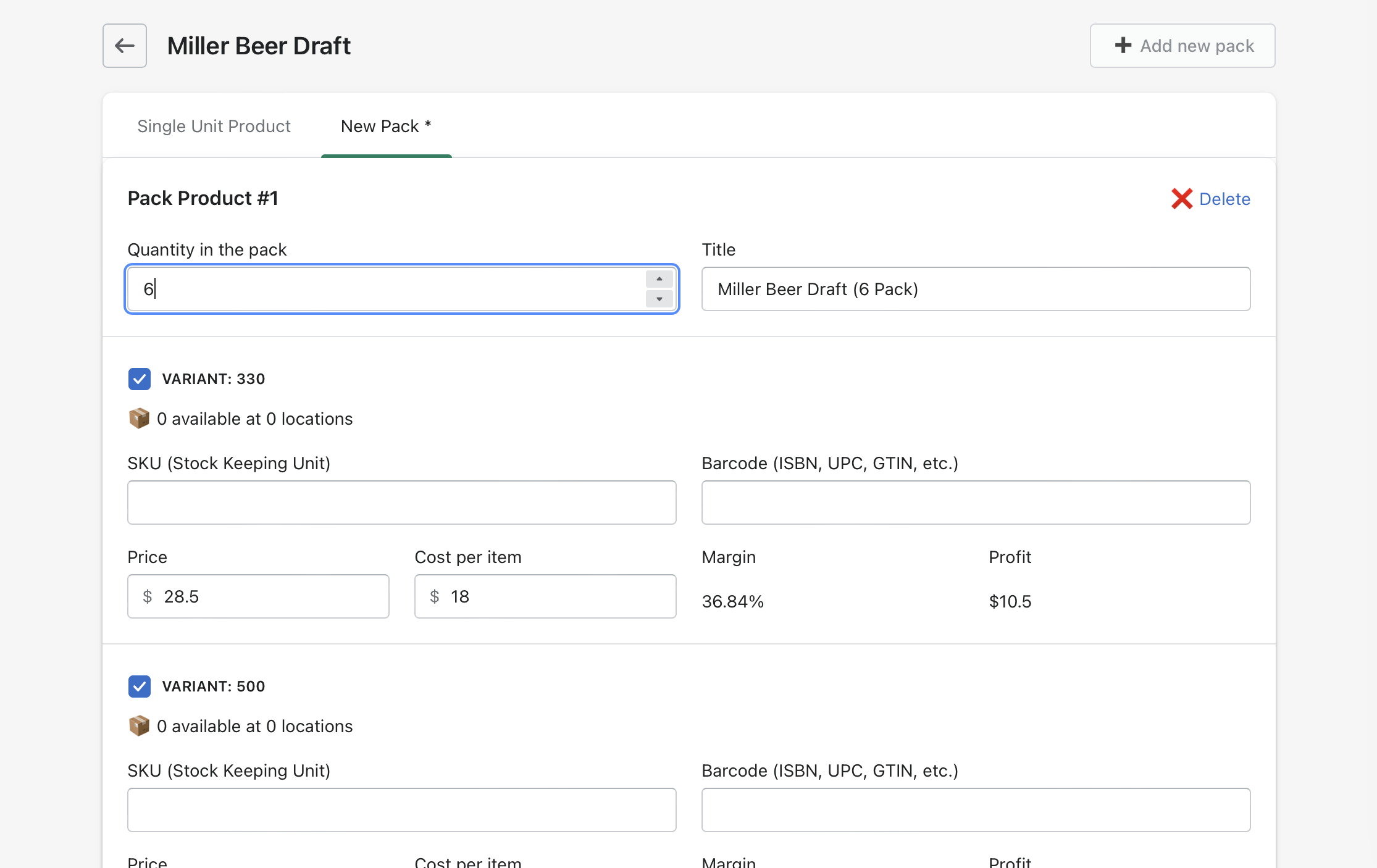
The newly created pack is available on the Products page in Admin, where you can upload additional images or manage collections.
<div class="dynamic-checkout__content" id="dynamic-checkout-cart" data-shopify="dynamic-checkout-cart"> <shopify-accelerated-checkout-cart wallet-configs="[{"supports_subs":true,"supports_def_opts":false,"name":"shop_pay","wallet_params":{"shopId":29900368,"merchantName":"The Shop Tinkerers","personalized":true}},{"supports_subs":false,"supports_def_opts":false,"name":"paypal","wallet_params":{"shopId":29900368,"countryCode":"US","merchantName":"The Shop Tinkerers","phoneRequired":false,"companyRequired":false,"shippingType":"shipping","shopifyPaymentsEnabled":true,"hasManagedSellingPlanState":null,"requiresBillingAgreement":false,"gatewayType":"CONNECTED","merchantId":null,"sdkUrl":"https://www.paypal.com/sdk/js?components=buttons\u0026commit=false\u0026currency=USD\u0026locale=en_US\u0026client-id=AexZEtAxk09Ncgj6FSWFFyGKbxxAZ_LTyJ2DPdJWl1YUlecinmc5AfIaRF2qYjWlusWahlzz6SVkY5Ci\u0026intent=capture","serviceableCountryCodes":["AC","AD","AE","AF","AG","AI","AL","AM","AO","AR","AT","AU","AW","AX","AZ","BA","BB","BD","BE","BF","BG","BH","BI","BJ","BL","BM","BN","BO","BQ","BR","BS","BT","BW","BY","BZ","CA","CC","CD","CF","CG","CH","CI","CK","CL","CM","CN","CO","CR","CV","CW","CX","CY","CZ","DE","DJ","DK","DM","DO","DZ","EC","EE","EG","EH","ER","ES","ET","FI","FJ","FK","FO","FR","GA","GB","GD","GE","GF","GG","GH","GI","GL","GM","GN","GP","GQ","GR","GS","GT","GW","GY","HK","HN","HR","HT","HU","ID","IE","IL","IM","IN","IO","IQ","IS","IT","JE","JM","JO","JP","KE","KG","KH","KI","KM","KN","KR","KW","KY","KZ","LA","LB","LC","LI","LK","LR","LS","LT","LU","LV","LY","MA","MC","MD","ME","MF","MG","MK","ML","MM","MN","MO","MQ","MR","MS","MT","MU","MV","MW","MX","MY","MZ","NA","NC","NE","NF","NG","NI","NL","NO","NP","NR","NU","NZ","OM","PA","PE","PF","PG","PH","PK","PL","PM","PN","PS","PT","PY","QA","RE","RO","RS","RU","RW","SA","SB","SC","SD","SE","SG","SH","SI","SJ","SK","SL","SM","SN","SO","SR","SS","ST","SV","SX","SZ","TA","TC","TD","TF","TG","TH","TJ","TK","TL","TM","TN","TO","TR","TT","TV","TW","TZ","UA","UG","UM","US","UY","UZ","VA","VC","VE","VG","VN","VU","WF","WS","XK","YE","YT","ZA","ZM","ZW"]}}]" access-token="501064acf5007febc8aacdcd65a58195" buyer-country="US" buyer-locale="en" buyer-currency="USD" shop-id="29900368" cart-id="8a7017ea95e14d2d483ee76c17feb377" enabled-flags="["1172c16a","a1d1f9a1","f5afabb3","370070f3"]" > <div class="wallet-button-wrapper"> <ul class='wallet-cart-grid wallet-cart-grid--skeleton' role="list" data-shopify-buttoncontainer="true"> <li data-testid='grid-cell' class='wallet-cart-button-container'><div class='wallet-cart-button wallet-cart-button__skeleton' role='button' disabled aria-hidden='true'> </div></li><li data-testid='grid-cell' class='wallet-cart-button-container'><div class='wallet-cart-button wallet-cart-button__skeleton' role='button' disabled aria-hidden='true'> </div></li> </ul> </div> </shopify-accelerated-checkout-cart> </div>